
Show Your Working: Making Powerline Ethernet faster
25 February 2024

Having wired networking is nice! The current iterations of Wi-Fi are admittedly very fast, but I feel a bit iffy trusting that the signal will always work at a good latency, when there's rogue slabs of concrete and surprise microwave sources to deal with.
My house has fiber internet which terminates at the wireless router I keep under my TV. To enable mission-critical house activities (e.g. streaming from my studio to Twitch/Diode Zone, using Steam Link from the couch), I have some Powerline Ethernet adapters which link the router to my studio PC upstairs. And for the past several years, they have been indistinguishable from magic; somehow they turn 1970s home electrical wiring into Cat 5e!
Until the rubber finally met the road; I tried to watch a Blu-Ray on my Home Theatre PC, streamed from my Studio PC, and it had big buffering pauses every 60 seconds. An early speed test I did showed the link speed for streaming the Blu-Ray was only 24 Mbps! But for some reason, downloading things from the studio PC was absolutely fine! At this point I realised I knew very little about how the magic boxes worked, or how I would go about isolating the problem.
What is Powerline Ethernet?
The Powerline Ethernet adapters I have are a pair of Netgear PL1000 extenders, which (amusingly) offer "up to Gigabit speeds". These adapters are based on the HomePlug AV2 standard (later rolled into IEEE 1901), which uses the live-neutral and live-ground pairs of your house's mains wiring as communication channels. Which is to say, the transmitter in the adapter generates a radio-band AC signal and sends it into the wiring with a coupling capacitor, allowing it to overlay the thumping great 50 Hz wave of the mains current. The receiver in the adapter filters out all the non-radio AC frequencies and tries to decipher a working signal from what's left. As for other mains devices, they should be filtering their power and ignore this as a little bit of line noise.
The trick that makes this possible is our friend Orthogonal Frequency-Division Multiplexing; basically if you have an analogue medium as a channel, you can cram multiple digital signals into that channel using carefully overlapped frequency bands and fancy error correction. For HomePlug AV2 the frequency bands in use range from 1.6 MHz to 86 MHz; you might recognise these numbers as "the end of AM radio" and "the start of FM radio", or if you are an Australian RF engineer "the end of getting sued by Macquarie Media" and "the start of getting sued by Southern Cross Austereo".
All well and good, but how do we test performance? Ethernet is a protocol running on top of this physical channel layer. None of the losses or error correction are exposed as packet level messages; all we get is the apparent link speed being slower or faster.
Testing Powerline Ethernet
After a bit of trial and error, I used a little tool called iperf3 to measure the maximum bandwidth on the link, with various combinations of things plugged in. Early on it became apparent that the speed in one direction was determined by the amount of noise at the receiver end; so in this case, something on my router's powerboard was dumping out enough RF slop to slow down the Blu-Ray data streaming from my studio PC. But which thing, and by how much? Let's find out!
Is it the surge protector?
One of the many axioms about Powerline Ethernet that frequently comes up is "for the love of God never run it through a surge protector". I assume this advice comes from a place where single-plug wall outlets are banned and lightning doesn't exist. Given that there's still a signal getting through, my gut feeling was to downgrade this advice to "never run it through a crap surge protector". But we can do some tests to prove the actual impact, even if we intend to ignore it. Here are speed tests for the bare outlets with/without a surge protector inline; both surge protectors are recent model HPM 12-socket powerboards, with the powerline adapter in the socket closest to the cable.
| Router surge protector | Studio surge protector | Router -> Studio speed | Studio -> Router speed |
|---|---|---|---|
| No | No | 196 Mbits/s | 141 Mbits/s |
| No | Yes | 186 Mbits/s | 135 Mbits/s |
| Yes | No | 186 Mbits/s | 144 Mbits/s |
| Yes | Yes | 168 Mbits/s | 131 Mbits/s |
So it's about a 10% speed hit. Sounds good to me! It's almost as if the designers knew that powerline communication was an electrical standard and designed their filtering circuits to cope.
Is it one of my appliances?
Now to test the impact of individual devices. My house is wired entirely with single-plug outlets (why would you do this???), so the intention is to keep using powerboards on both ends. The baseline setup is:
- my full studio setup online and unchanged
- the Powerline Ethernet adapter, an ASUS router and a fiber NTD plugged into the router-side powerboard
As the issue was happening at the router-side receiver, I decided to try plugging in combinations of the devices that make up my home theatre system.
| Amp | TV | MiSTer | PC | Router -> Studio speed | Studio -> Router speed |
|---|---|---|---|---|---|
| No | No | No | No | 108 Mbit/s | 147 Mbits/s |
| No | No | No | Yes | 108 Mbit/s | 114 Mbits/s standby, 93.1 Mbits/s on |
| No | No | Yes | No | 107 Mbit/s | 122 Mbits/s standby, 108 Mbits/s on |
| No | Yes | No | No | 109 Mbit/s | 142 Mbits/s standby, 112 Mbits/s on |
| Yes | No | No | No | 103 Mbit/s | 104 Mbits/s standby, 38 Mbit/s on |
| Yes | Yes | Yes | Yes | 105 Mbit/s | 91 Mbit/s standby, 40 Mbit/s on |
There it is! My problem was that I wanted some sound to go with my Blu-Ray, unaware that my digital amplifier has a side-gig of spewing out RF pollution all day.
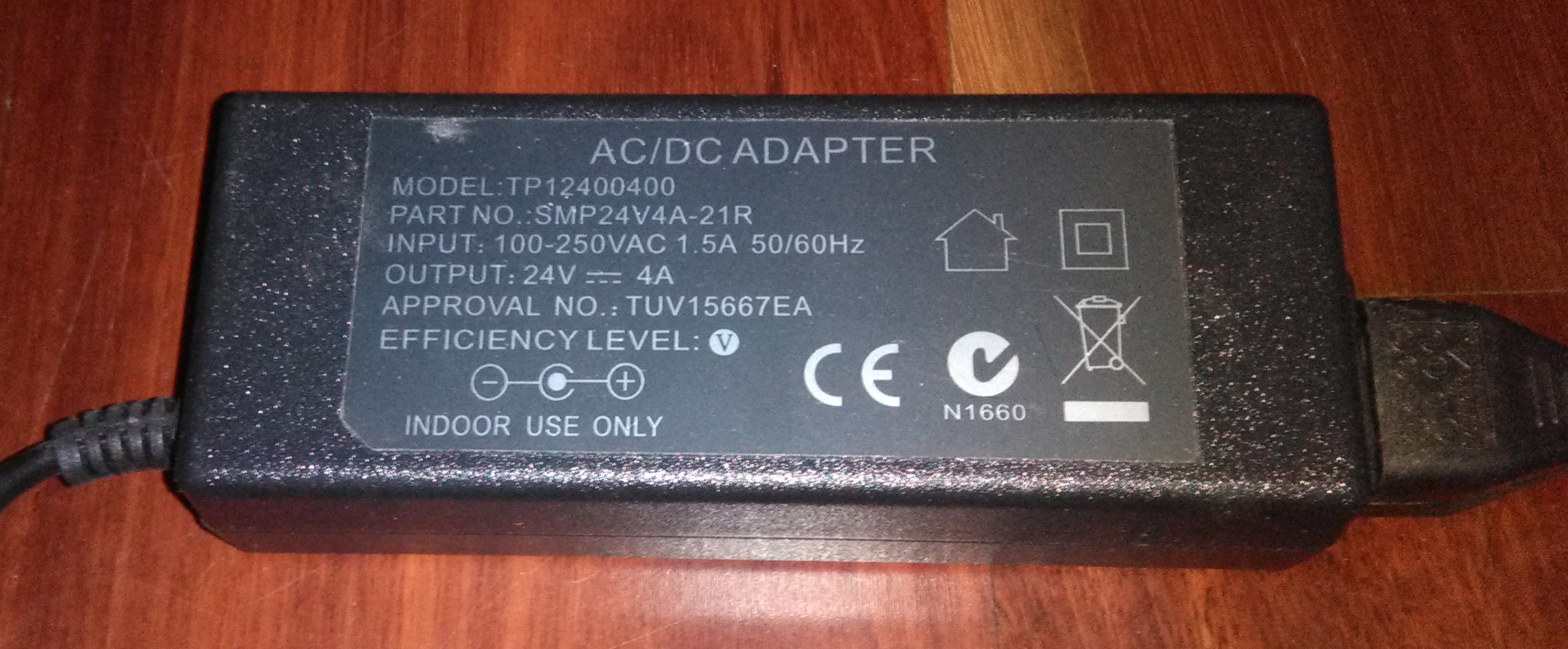
The class-D amp in question came with this unbranded 24V 4A DC power brick. Like all mystery power bricks it is adorned with The Runes: CE certification, the C-Tick mark for ACMA approval, and an approval number that suggests TUV certified it. I could find none of these numbers in the public certification database, but we can at least be at ease that whoever sold this power brick owned a sticker printer.
Does replacing this with a legit Australian-certified power supply fix the issue? I got a replacement from Altronics; notably it is heavier, has bigger capacitors and features a ferrite choke on the lead. My enthusiasm for knowledge did not extend to cracking open the sealed cases to compare circuit boards, but filtering components are usually the first things that get stripped for cost reasons as end-users tend not to notice.
Connecting to host 192.168.1.4, port 5201
Reverse mode, remote host 192.168.1.4 is sending
[  5] local 192.168.1.8 port 53286 connected to 192.168.1.4 port 5201
[ ID] Interval           Transfer     Bitrate
[  5]   0.00-1.00   sec  6.25 MBytes  52.4 Mbits/sec
[  5]   1.00-2.00   sec  7.50 MBytes  62.9 Mbits/sec
[  5]   2.00-3.00   sec  8.75 MBytes  73.4 Mbits/sec
[  5]   3.00-4.00   sec  9.12 MBytes  76.5 Mbits/sec
[  5]   4.00-5.00   sec  7.38 MBytes  61.9 Mbits/sec
[  5]   5.00-6.00   sec  6.88 MBytes  57.7 Mbits/sec
[  5]   6.00-7.00   sec  7.12 MBytes  59.8 Mbits/sec
[  5]   7.00-8.00   sec  6.25 MBytes  52.4 Mbits/sec
[  5]   8.00-9.00   sec  7.12 MBytes  59.8 Mbits/sec
[  5]   9.00-10.00  sec  7.75 MBytes  65.0 Mbits/sec
[  5]  10.00-11.00  sec  7.25 MBytes  60.8 Mbits/sec
[  5]  11.00-12.00  sec  7.75 MBytes  65.0 Mbits/sec
[  5]  12.00-13.00  sec  9.12 MBytes  76.5 Mbits/sec
[  5]  13.00-14.00  sec  9.38 MBytes  78.6 Mbits/sec
[  5]  14.00-15.00  sec  9.12 MBytes  76.5 Mbits/sec
[  5]  15.00-16.00  sec  8.88 MBytes  74.5 Mbits/sec
[  5]  16.00-17.00  sec  9.25 MBytes  77.6 Mbits/sec
[  5]  17.00-18.00  sec  8.62 MBytes  72.3 Mbits/sec
[  5]  18.00-19.00  sec  8.75 MBytes  73.4 Mbits/sec
[  5]  19.00-20.00  sec  8.62 MBytes  72.3 Mbits/sec
[  5]  20.00-21.00  sec  8.50 MBytes  71.3 Mbits/sec
Much better. Interestingly you can see what looks to be the adaptive error correction optimising for the new noise profile.
Conclusions
So, lessons learned:
- The receiving speed of Powerline Ethernet is determined by the amount of RF noise at the receiving end.
- Recent surge protectors and powerboards are fine.
- Plugging in devices at the receiving end will nibble away at the speed but not by much, IF they use a certified power supply that doesn't cut corners!
- If you're experiencing weird or asymmetrical drops in link speed, try unplugging all of the power supplies to isolate the problem.
- Consider replacing no-name DC power bricks with certified ones, or adding a ferrite choke to the lead.
Very special thanks to @adonm for identifying the source of the problem in one guess.